For labour hire, recruitment and workforce teams

Less chasing, more placing.

Manage recruitment, onboarding, compliance, timesheets, payroll and client communication from one connected platform.

RecruitOnboardRosterPayBill
The desktop platform PRODUCT PREVIEW
app.workhr.app/candidates
A Workhr candidate record: verified hours, margin, placements, tickets and what to do next
One connected record CandidateJob OrderAssignmentShiftTimesheetPayroll + Invoice
WHERE WORKFORCE OPERATIONS BREAK

Every handoff creates cost, risk and another version of the truth.

Workhr connects the desk, the worker, the client and finance so the same record moves through the whole job.

Fill risk

Open orders age quietly

Scattered candidate records and manual shortlists slow the response when a client needs people now.

Compliance

Expiry lives in spreadsheets

Right-to-work, licences and inductions are hard to trust when evidence sits across inboxes and folders.

Time leakage

Hours get re-keyed

Roster, attendance, timesheet, pay and invoice drift apart, creating disputes and margin leakage.

Client experience

Communication becomes chasing

Bookings, approvals and updates disappear into calls and email threads with no shared operational view.

RECRUITMENT + ATS

Move from applicant to assignment without losing momentum.

Keep candidate history, availability, skills, applications, job orders and submissions in one searchable talent system.

1

Attract

Publish roles to your careers site and capture structured applications.

2

Qualify

Parse CVs, track checks and keep every candidate conversation together.

3

Match

Search by skill, location, availability, compliance and assignment fit.

4

Submit

Send a clean shortlist and track the client response without side lists.

5

Place

Turn acceptance into an assignment with rate and compliance context intact.

AI CV PACKS + TALENT POOLS

A client-ready CV pack in one click.

Ask for people the way you’d say it — “5 forklift drivers ready to go” — and get a scored shortlist with a reason beside every name. When it’s time to submit, Workhr writes the pack for you.

  • Branded CV plus cover letter, generated from the record and filed on the candidate
  • Plain-English talent search that says who’s free, ticketed and nearby — and why
  • Save any result as a hotlist, then text or shortlist the whole pool at once
app.workhr.app/tools/cv-builder
Workhr CV builder generating a branded CV and cover letter pack
CRM + CLIENT PORTAL

Keep sales promises connected to delivery.

Manage leads, contacts, client sites, rate cards and conversations alongside the people and hours you deliver. Clients get a focused portal for requests, workers, approvals, compliance and documents.

  • Pipeline and client history beside operational activity
  • Two-way messaging and SMS logged on the record — broadcast to a whole pool at once
  • Site-level contacts, billing rules and rate cards
  • Self-serve requests and timesheet approvals
Explore the client portal →
Agency workspace

One client record

Deals, sites, contacts, conversations, workers and spend stay connected.

CRM · pipeline · comms
Client workspace

Less chasing

Request workers, see coverage, approve time and find documents without an email chain.

Requests · approvals · documents
ROSTERING + GPS ATTENDANCE + TIMESHEETS

Plan the week. Prove the shift. Close the time.

Build rosters around assignments and availability, capture sign-in and sign-out with site evidence, then move approved time into the pay and bill workflow.

  • Coverage, conflicts and unfilled shifts in one view
  • GPS and passkey-verified sign-in — the person clocking in is the person you placed
  • Paper or emailed timesheets? AI reads them into the same approval queue
  • Worker submission and client approval without re-keying
app.workhr.app/timesheets
Workhr timesheets
PAYROLL + BILLING

One approved hour. Two clean financial outcomes.

Workhr owns the operational record and hands trusted pay items and invoices to the finance systems that should receive them — with margin visible on every job, to the people entitled to see it.

SourceApproved timesheetHours, breaks, day type, assignment and rate snapshot
PayPayroll-readyDraft pay items flow to Xero Payroll or your connected engine
+
BillInvoice-readyClient, site, cost centre and charge rules stay attached
CONTRACTS + AGREED RATES

Your contract prices your work.

Put the signed terms of business on the client record and AI reads the commercial terms out of it — charge rates, payment terms, multipliers — quoting the exact line it found them on. Your team confirms; nothing prices work unreviewed.

  • Contracts on file, versioned, with AI-read terms and quoted evidence
  • Confirmed terms become a per-role rate schedule for that client
  • New job orders arrive already priced — charge, pay and margin done
app.workhr.app/companies/rate-cards
A client’s agreed rate schedule in Workhr with per-role pay, charge and margin
COMPLIANCE + HEALTH AND SAFETY

Know who can work, where they can work and what happened on site.

Eligibility is checked before deployment, while field evidence and incidents stay linked to the worker, site and assignment.

Before assignment

Right-to-work and qualifications

Expiry watchlists, evidence and role requirements make eligibility visible before anyone is placed.

Before shift

Inductions, PPE and fatigue

Surface missing inductions, overlapping work and fatigue thresholds — and issue the right PPE from a managed catalogue with sizes, stock and sign-off.

During work

Attendance and safety capture

GPS events, welfare checks and multilingual incident capture create a defensible timeline.

THE WORKER EXPERIENCE

Worker adoption is an operations feature.

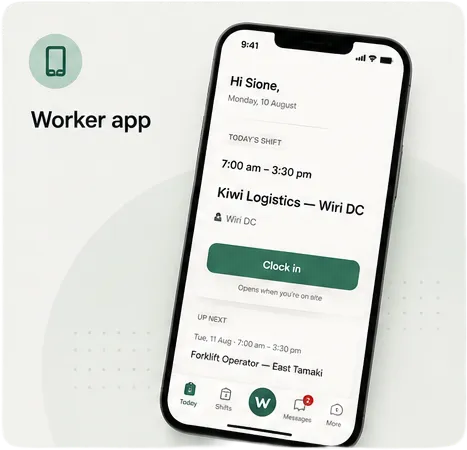
The worker portal keeps today’s shift, sign-in, timesheets, messages, payslips and documents close at hand. This is the real Workhr worker experience.

  • Built for a phone and clear in a hurry
  • Multilingual communication and forms
  • The worker’s actions update the same operational record
Workhr worker portal
Worker portal
AI + INTEGRATIONS

Intelligence over the work, not beside it.

Ask operational questions in plain English, rank suitable candidates, draft follow-ups and surface risks from the same connected data your team already uses. Between questions, an always-on brain watches the operation — no-shows, missing sign-ins, expiring paper — and raises the alert before it becomes a problem.

JobAdderAstuteiPayrollXeroGmailMicrosoft 365Claude
Ask Workhr
Who can cover two forklift shifts in Wiri tomorrow?
I found six available workers with current forklift endorsements, valid inductions and no fatigue conflicts. Three are within 15 km.
Which timesheets could delay payroll?
Four need attention. Two are waiting on client approval and two have a missing break declaration.
BRING YOUR OWN STACK

Keep the ATS and payroll you trust. We take care of the rest.

Workhr doesn’t demand a rip-and-replace. Connect what you already run — we wire it in, and everything between the systems stops being someone’s Friday job.

Bring your own ATS

Keep JobAdder

Placements flow straight in as job orders — candidates, context and all. Your recruiters keep their workflow; your ops team stops re-keying it.

JobAdder · live sync
Bring your own payroll

Keep Astute, iPayroll or Xero

Approved hours flow out as payroll-ready items and clean invoices — pushed, verified by read-back and reconciled every cycle.

Astute · iPayroll · Xero
EVERYTHING IN THE BOX

One system, or eleven you no longer pay for.

Grouped by the job it does, not the module it lives in. Every line is live software, not a roadmap.

Win the work

  • CRM — leads, opportunities, companies, contacts
  • Pipeline and revenue forecast
  • Job ads and a careers site
  • Client requests straight from their portal
  • Commission schemes and splits

Fill it

  • AI talent search in plain language
  • Instant client-ready CV packs
  • Applications, screening and interviews
  • Shift offers workers accept on their phone
  • Skills, credentials and expiry watchlists

Run the shift

  • Scheduling, rosters and coverage
  • GPS sign-in, breaks and auto sign-out
  • Site packs, task maps and arrival briefs
  • PPE catalogue with sizes and sign-off
  • Lone-worker SOS and welfare timers

Get paid

  • Timesheets approved by the client who used them
  • One hour → payroll and invoice together
  • Pay and bill rates with margin visible
  • Xero and iPayroll, connected both ways
  • Expenses, allowances and leave

Stay compliant

  • Right to work, checked before deployment
  • Hazard register with critical-risk flags
  • Notifiable events routed to the right regulator
  • Clock-in refused until requirements are met
  • Hash-chained audit over every decision

Reach people

  • SMS, in-app messaging and push
  • Broadcasts to a filtered crew
  • Push-to-talk radio between sites
  • Voice notes transcribed and filed
  • Email in and out, threaded to the record
STRAIGHT ANSWERS

Whatever brought you here, start with your question.

Owners ask about margin, consultants about speed, admins about Fridays. Here’s the short version of each.

How do I see margin on every job?
Each job order shows pay, charge and margin per hour — visible only to roles you permit. When a client has an agreed rate schedule, new orders arrive already priced from it. See the platform →
How fast can I send a client-ready CV?
One click. Workhr generates a branded CV plus cover letter from the candidate record, files it on their profile, and it's ready to send — no late-night formatting.
What happens to paper or emailed timesheets?
AI reads them into the same approval queue as digital ones. A person confirms, nothing is re-typed, and the hours flow to pay and invoice like any other timesheet.
We already use JobAdder, Astute or Xero — do we have to move?
No. Workhr connects to them: placements flow in from JobAdder, pay and bill can run through Astute, invoices land in Xero. Replace tools one at a time, if and when you're ready. See integrations →
What do our clients get?
A focused portal: they raise requests that land as priced, rosterable job orders, approve timesheets, and see who's on their site — without an email chain. Explore the client portal →
Will workers actually use it?
The worker portal is built for a phone and clear in a hurry: today's shift, GPS sign-in, availability, payslips and messages — multilingual, no training course required.
Where does AI touch the money?
It proposes, people confirm. AI reads contracts and timesheets and suggests candidates, but nothing prices work or pays anyone until a person has reviewed it.
Who sets it up and supports us?
We do — from Christchurch. Workhr is configured around your workflows, statuses and rate rules in days, and support is in your timezone from people who know your setup. Book a demo →

FOR BUSINESSES

See your workforce operation in one system.

Bring us your real recruitment, deployment, payroll or client-approval workflow. We’ll show you how it runs in Workhr.

Workhr · the recruitment operating system